
|
Supplier Dockets |
| Back to Content |
|
Creating/editing the supplier
related documents (Purchase Orders)
Steps 1-3 Step 4 Receiving the products Step 5-6 Steps 1-3 The very same procedure as described before (CREATING THE CUSTOMER RELATED DOCKET chapter) is applied to entering docket addressed to supplier, Purchase Order (but, of course, it is calculated differently since you are receiving products and adding to your stock, and you are paying to supplier). Steps 1-3 are being made exactly like they are done in previous chapter. Step 4
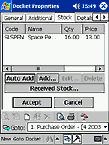
This step is slightly different. You still can add the products to your Purchase Order
by selecting them from the list (Add... button). But you can also use Auto Add
button.
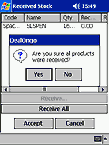
After you finished adding the products to docket, you can proceed to next window or (if you have already received the products), tap Received Stock... button. In Received Stock window Receive... button allows to receive the product per item while Receive All button receives the whole list. The products received are automatically added to your stock once you have confirmed the operation. Steps 5-6Steps 5-6 are again being made exactly like they are done in previous chapter (CREATING THE CUSTOMER RELATED DOCKET). |
| Back to Content |
| © PDASet Software |