Tracking the payments
Option 1
Option 2
- new document on the base
of existing one
Option 3
The system provides three options to process the payments to you.
Option 1
|
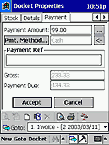
Fig.25. Docket/ Payment
|
Processing the payment directly in the document.
Payment window of Docket Properties allows you to enter the amount received according
to current docket from customer and the Payment Method (Cash, Wire Transfer,
Credit Card, etc.). If only the part of amount is accepted, you will see the remained
Payment Due in corresponding field. Same procedure available in Purchase
Orders for amounts you are paying to suppliers.
back to top
Option 2
|
|
|
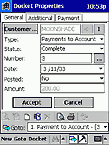
Fig.26a. Payment to Invoice/ General
|
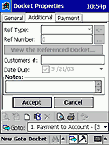
Fig.26b. Payment to Invoice/ Additional
|
| |
|
| |
|
|
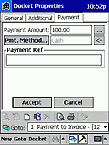
Fig.26c. Payment to Invoice/ Payment
|
Accepting the Payment to Invoice. Payment to Invoice is a special type
of document. It allows processing a payment as a separate docket related to target invoice, so
you can later easily find it in database for reviewing or editing. It is especially useful in
case of partial payments - each part of payment will be easily accessible and the dockets will
provide you with all the necessary details.
The detailed description of all docket fields is available in CREATING/
EDITING THE CUSTOMER RELATED DOCUMENTS (INVOICES, QUOTATIONS, DELIVERY DOCKETS, ETC.)
chapter.
back to top
Creating new document on the base
of existing one
|
|
|
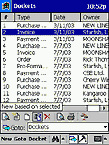
Fig.27a. New based on selected
|
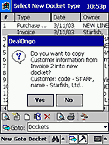
Fig.27b. Transferring details
|
The easiest way to bind Payment to Invoice with the target Invoice is
to use New based on selected button. Select the related invoice in the list and
tap  , like shown on
above screenshots. Export the invoice details to new document, and Payment to Invoice
will have almost all fields automatically filled, including Referenced Docket
Type (Ref Type) and Referenced Docket Number (Ref Number).
You will only have to enter the amount of payment. , like shown on
above screenshots. Export the invoice details to new document, and Payment to Invoice
will have almost all fields automatically filled, including Referenced Docket
Type (Ref Type) and Referenced Docket Number (Ref Number).
You will only have to enter the amount of payment.
back to top
Option 3
Accepting the Payment to Account. Payment to Account is somewhat similar to
Payment to Invoice, but it has no reference to a certain docket. It allows processing a
payment as a separate docket too, so you can later easily find it in database for reviewing or
editing.
Payments processed as Payment to Invoice or Payment to Account docket types are
easily traceable in Dockets section of the program through Search Criteria
tool (check the details in FINDING THE NECESSARY ENTRY IN DATABASE
chapter).
back to top
|
